

Apple AirPods are popular wireless earbuds known for their sound quality, convenient connectivity, and integration with Apple devices. However, counterfeit AirPods can look remarkably similar to genuine products, making it difficult to identify them just by appearance. If you are planning to buy AirPods or want to check a pair you already own, there are several ways to assess their authenticity.
The most reliable approach is to combine serial number verification, model identification, physical inspection, software checks, and purchase verification. No single test can guarantee that AirPods are genuine, because counterfeit products may copy authentic product information.
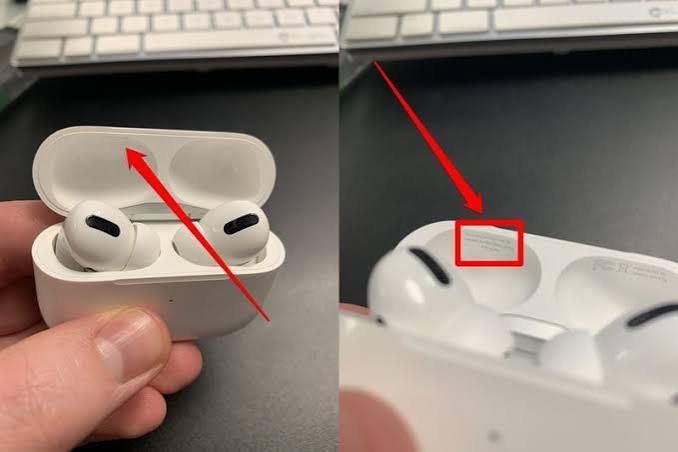
Check the AirPods Serial Number
Checking the serial number is a useful first step. Apple provides instructions for finding your AirPods serial number on the device, charging case, packaging, and connected Apple devices.
Follow these steps:
- Connect your AirPods to your iPhone.
- Open Settings and select Bluetooth.
- Find your AirPods and tap the information button next to their name.
- Look for the serial number in the device details.
- Compare it with the number printed inside the charging case and on the original box, if available.
You can also use Apple’s official Check Coverage website to look up the serial number.
Important: A serial number that Apple recognizes does not automatically prove authenticity. Counterfeit manufacturers may copy serial numbers from genuine products. Treat this check as one part of the verification process.
Verify the AirPods Model Number
Every AirPods generation has specific model numbers. You can find the model number in your iPhone’s Bluetooth settings or on the earbuds themselves, depending on the model.
Visit Apple’s official Identify Your AirPods guide and compare your model number with the official information. The guide also explains how to identify different charging cases.
Check that the model number corresponds to the claimed generation and that the charging case is compatible with those earbuds.
If a seller claims the product is a particular generation but the model number identifies a different one, investigate before purchasing. Remember that counterfeit products can also copy genuine model numbers, so this test is not conclusive by itself.
Inspect the Build Quality and Packaging
Examine the earbuds, charging case, hinges, speaker openings, and printed labels carefully. Genuine AirPods should have construction consistent with the official design of their specific model.
Look for these details:
- Finish: The surfaces should generally be clean and evenly finished, without obvious rough edges or poor assembly.
- Printing: Text and regulatory markings should be clear and consistent with the product.
- Charging case: The lid should fit properly, and the case should match the claimed model.
- Packaging: Check the product name, model details, and barcode label for inconsistencies.
Poor finishing, spelling mistakes, uneven gaps, or mismatched labels can be warning signs. However, packaging can be copied, and minor cosmetic imperfections do not automatically prove that a product is counterfeit.
Connect AirPods to an iPhone
Genuine AirPods are designed to integrate with compatible Apple devices. When you open the charging case near an iPhone, a setup animation may appear, allowing you to connect them.
After pairing, check whether the expected settings and features are available for that particular model. Depending on the generation, these may include battery information, automatic ear detection, noise cancellation, or other supported controls.
You can also view the model information and firmware details through your device settings. Apple explains how to access this information in its official AirPods support guide.
Be cautious if the earbuds display unexpected warnings or lack features advertised for their model. Nevertheless, pairing successfully or displaying a setup animation is not definitive proof of authenticity, as some counterfeit products imitate these features.
Test Sound Quality and Features
Listen to music, make a phone call, and test the controls. Genuine AirPods should perform consistently with the capabilities advertised for their specific model.
For AirPods models that support active noise cancellation, test that feature in a suitable environment. Check microphone performance, connection stability, and whether the controls behave as expected.
Poor audio, frequent disconnections, or malfunctioning features may indicate a problem, but they can also result from damage, incorrect settings, or battery deterioration. Sound quality alone cannot establish whether AirPods are original.
Buy From an Authorized Seller
The safest way to reduce the risk of buying counterfeit AirPods is to purchase them from Apple’s official store or an authorized reseller.
In India, you can start with the official Apple India website. If buying from a marketplace or individual seller, review seller ratings, request a valid invoice, check the return policy, and avoid deals that seem unrealistically cheap.
For second-hand AirPods, inspect the physical product and test it before paying whenever possible. A receipt is useful evidence of purchase, although it is not absolute proof that the product is genuine.
Final Thoughts
To check original AirPods, verify the serial number and model number, inspect the build quality, test supported features, and evaluate the seller’s credibility. Since counterfeit products can imitate several authentic details, do not rely on a single test. When you need greater confidence, seek assistance from Apple Support before making a purchase or accepting a questionable product.
Frequently Asked Questions
Q. Can I check original AirPods using a serial number?
Yes. You can check the serial number using Apple’s official coverage website. However, a recognized serial number alone cannot confirm authenticity because counterfeit products may use copied numbers.
Q. Can fake AirPods connect to an iPhone?
Yes. Some counterfeit earbuds imitate Apple’s pairing process and display pop-up animations. Successful pairing does not guarantee that the product is genuine.
Q. Do original AirPods always come in sealed packaging?
New retail products are generally packaged for sale, but packaging alone cannot establish authenticity. For used products, an opened box is not necessarily suspicious.
Q. Where can I verify my AirPods model?
Use Apple’s official Identify Your AirPods guide to compare the model number and charging case details.
Q. What should I do if I suspect my AirPods are fake?
Keep your purchase receipt, packaging, and product photographs. Contact Apple Support for assistance and approach the seller or marketplace to discuss a refund if appropriate.