

CP Plus is a popular security and surveillance brand in India, offering CCTV cameras, network video recorders (NVRs), digital video recorders (DVRs), and other monitoring equipment. When installing a security system at home, in an office, or at a commercial property, choosing a genuine camera is important for reliable recording, image quality, and system compatibility.
Counterfeit or misrepresented cameras may look similar to genuine products but can have different hardware, software, or performance capabilities. Knowing how to check an original CP Plus CCTV camera can help you avoid suspicious products and make a more informed purchase.
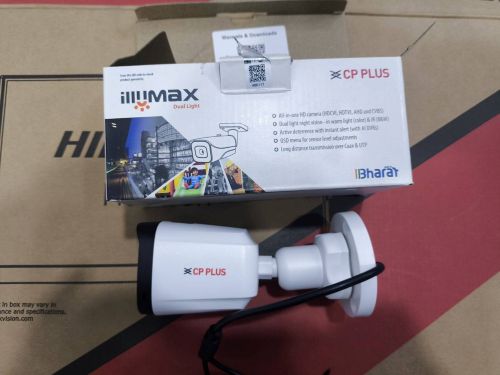
Check the CP Plus Logo and Packaging
The first step is to examine the camera’s branding and packaging. Genuine CP Plus products should have branding and product information consistent with the specific model.
Look for the following details:
- Correct spelling of the CP Plus brand name.
- Clear, properly printed labels.
- Product model number and identification details.
- Manufacturer or distributor information, where applicable.
- Packaging that matches the advertised product.
- Documentation and accessories appropriate to the model.
Compare the product with photographs and specifications available on the official CP Plus website.
Be cautious if the logo appears distorted, the packaging contains spelling mistakes, or product information seems inconsistent. However, counterfeit manufacturers may copy genuine packaging, so branding alone cannot establish authenticity.
Verify the Model Number and Serial Number
Checking the model number is one of the most useful ways to identify a CP Plus CCTV camera.
Look for the model number on the camera label, packaging, invoice, or product documentation, depending on the model. Compare it with the specifications listed on the official CP Plus website.
Check whether the model matches the advertised features, such as:
- Camera resolution.
- Indoor or outdoor use.
- Fixed or motorised lens.
- Night-vision capabilities.
- Wired or wireless connectivity.
- Compatibility with the intended DVR or NVR.
If a model number corresponds to a different camera or its specifications do not match the advertisement, ask the seller for clarification.
A serial number can also help the manufacturer identify a product. However, matching model and serial numbers alone do not guarantee authenticity because counterfeit sellers may copy genuine identification details.
Inspect the Camera’s Build Quality
Examine the camera housing, lens, mounting bracket, connectors, and other visible components.
Look for clean finishing, properly fitted parts, and labels that appear consistent with the product. Be cautious if the housing has obvious defects, connectors are loose, or the camera shows signs of previous installation despite being sold as new.
For outdoor cameras, check that the product’s stated weather-resistance rating matches the intended installation environment.
Build quality varies between camera models, so compare the camera with the manufacturer’s specifications rather than assuming all genuine products should look identical.
Never open the camera or tamper with its electrical components simply to check authenticity.
Check the Software and Camera Performance
Once installed by a qualified technician, verify that the camera works as expected and supports the features advertised for its model.
Depending on the product, check the live video feed, recording quality, night vision, motion detection, and compatibility with the intended recording system.
If the camera supports a CP Plus mobile application or other official software, follow the manufacturer’s instructions for connecting and configuring it.
Be cautious if the camera repeatedly disconnects, lacks advertised features, or cannot be configured as described. These problems may indicate a defective product, compatibility issue, or misrepresentation, but they do not automatically prove that the camera is counterfeit.
Successful connection to an application is also not definitive proof of authenticity.
Verify the Warranty and Purchase Invoice
Warranty information can provide additional supporting evidence when checking a CP Plus camera.
Ask the seller for a proper invoice and confirm the applicable warranty terms. Contact CP Plus through its official website to ask whether the product details and warranty eligibility can be verified.
Keep the invoice, packaging, serial number, and photographs of the camera label. Be cautious if the seller refuses to provide purchase documentation or cannot explain the product’s origin.
Buy From an Authorised CP Plus Dealer
Purchasing from an authorised dealer is one of the most effective ways to reduce the risk of buying counterfeit or misrepresented CCTV equipment.
Use the official CP Plus website to explore product information and dealer resources.
Compare prices before purchasing, and be cautious about unusually low offers combined with missing invoices, unclear product details, or suspicious packaging. Discounts alone do not prove that a product is fake.
Final Thoughts
Checking an original CP Plus CCTV camera requires more than examining the logo or testing its video feed. Verify the model and identification details, compare specifications, check warranty eligibility, and buy from a reputable dealer. If anything appears suspicious, seek confirmation from CP Plus before relying on the camera to protect your property.
Frequently Asked Questions (FAQs)
Q. How can I check whether a CP Plus CCTV camera is original?
Check the branding, model number, serial number, product specifications, build quality, warranty information, and seller credentials. Contact CP Plus if you need further verification.
Q. Can I verify a CP Plus camera using its serial number?
The serial number may help the manufacturer identify the product, but it is not conclusive proof of authenticity. Ask CP Plus to verify the available details.
Q. Does an original CP Plus camera always have a QR code?
Not necessarily. Identification and verification features vary by model. Follow the manufacturer’s instructions for the specific camera.
Q. Can fake CP Plus cameras connect to mobile applications?
Some counterfeit or misrepresented devices may imitate expected connectivity features. Successful connection alone does not guarantee authenticity.
Q. What should I do if I suspect my CP Plus camera is fake?
Keep the invoice and packaging, photograph the product label, and contact CP Plus or the seller for assistance before relying on the camera for security.