

Amaron batteries are widely used in cars, motorcycles, and other vehicles because of their starting performance, durability, and maintenance requirements. However, buying a counterfeit, mislabelled, or incorrectly represented battery can lead to poor performance, unexpected breakdowns, and unnecessary expenses.
If you are planning to purchase an Amaron battery or want to verify one already installed in your vehicle, checking the product label, serial number, warranty details, seller credentials, and physical condition can help you make a more informed decision.
Here is how to check whether an Amaron battery is original.
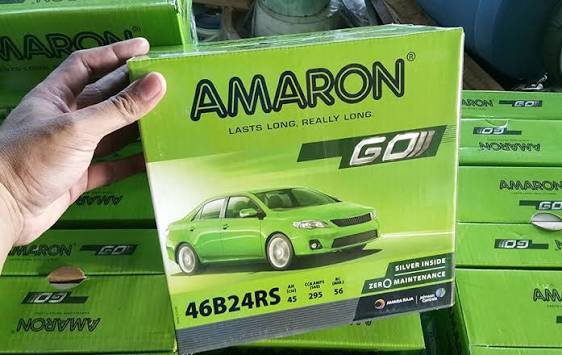
Check the Amaron Logo and Product Label
Start by examining the battery’s branding and product label. Genuine Amaron batteries should have branding, product information, and specifications consistent with the particular model.
Look for the following details:
- The Amaron brand name and logo.
- The battery model or product code.
- Voltage and capacity information, such as 12V and the rated ampere-hours (Ah).
- Manufacturing, identification, or traceability details where provided.
- Warranty information and applicable product markings.
Check for misspellings, poorly printed labels, inconsistent specifications, or signs that a label has been replaced. These can be warning signs, although label quality alone cannot confirm whether a battery is genuine.
Compare the product with information available through the official Amaron website rather than relying solely on photographs supplied by a seller.
Verify the Serial Number and Warranty
A product’s serial number or other identification details can help establish its identity and support warranty verification. The exact identification format and location may vary by battery model.
Ask the seller to explain how the battery can be verified through Amaron’s authorized sales or service network. Provide the battery’s identification details and purchase invoice when contacting the company or an authorized dealer.
Also check whether the warranty is eligible for registration or validation under the manufacturer’s current policy.
Important: A serial number printed on a battery is not conclusive proof of authenticity. Counterfeiters may copy genuine identification details, so combine this check with seller verification and an official warranty check.
Check the Battery’s Manufacturing Date and Condition
A genuine battery can still be old stock or previously used, so check its condition before purchasing.
Inspect the battery for:
- Clean casing without cracks, leakage, or unusual damage.
- Terminals without obvious clamp marks, heavy corrosion, or scratches suggesting previous installation.
- A legible manufacturing or identification code, where applicable.
- Packaging and labels that appear intact and consistent with the product.
Ask the dealer when the battery was manufactured and whether it has been stored according to the manufacturer’s recommendations. A recent manufacturing date is desirable, but an older battery is not automatically fake. If the date code is unclear, ask an authorized dealer to interpret it.
Verify the Battery Warranty Online
Amaron provides an official product-status portal for checking battery and HUPS records.
Follow these steps:
- Visit the official Amaron warranty and product-status portal.
- Enter the battery/HUPS serial number, registered mobile number or email address, or vehicle registration number, as supported by the portal.
- Select the option to check the product status.
- Review the information and contact Amaron if the details are missing or inconsistent.
You can also explore the official Amaron Konnekt app for product registration and digital warranty information.
If the warranty record does not appear, do not immediately conclude that the battery is fake. Registration delays or incorrect details may cause problems. Ask the manufacturer or an authorized dealer to verify the product.
Buy From an Authorized Amaron Dealer
Purchasing from an authorized dealer is one of the best ways to reduce the risk of receiving a counterfeit or misrepresented battery. You can use the official Amaron website to find relevant product and dealer information.
Before paying, request a proper invoice showing the battery model, purchase date, serial number where applicable, and warranty details. Confirm that the battery is suitable for your vehicle and that the warranty can be registered correctly.
Avoid suspiciously low prices, sellers who refuse to provide invoices, or dealers who cannot explain the warranty process.
Final Thoughts
To check an original Amaron battery, examine its label, verify its identification details, inspect its condition, check the warranty record, and purchase from a reliable dealer. These checks can help you identify suspicious products and avoid buying a used or misrepresented battery as new. When in doubt, seek verification directly from Amaron before completing the purchase.
Frequently Asked Questions (FAQs)
Q. How can I check whether an Amaron battery is original?
Check its product label, identification details, physical condition, warranty status, and seller credentials. For additional assurance, contact Amaron through its official website.
Q. Can I check an Amaron battery’s authenticity using its serial number?
The serial number can help verify product records and warranty information, but it is not conclusive proof on its own. Ask the manufacturer to investigate any discrepancies.
Q. How can I check my Amaron battery warranty online?
Visit the official Amaron product-status portal and enter one of the supported identification details to check the available record.
Q. Does an original Amaron battery always have a warranty?
Warranty eligibility and duration depend on the product, purchase conditions, and applicable terms. Request the manufacturer’s warranty details and keep your invoice.
Q. What should I do if my Amaron battery appears fake?
Avoid installing or relying on a suspicious battery until its status is verified. Keep the invoice and photographs, and contact Amaron or an authorized dealer for assistance.